
If you're an authorized user on a customer site, you can add bed capacity to a program using the Special Fieldset in Program Manager. This makes it easier for seekers and navigators to see how many beds are available right on the program card.
This is not a feature that a Community Based Organization (CBO) can add. They are able to keep this up to date once you have added it to their program for them.
Adding the Available Bed Special Fieldset
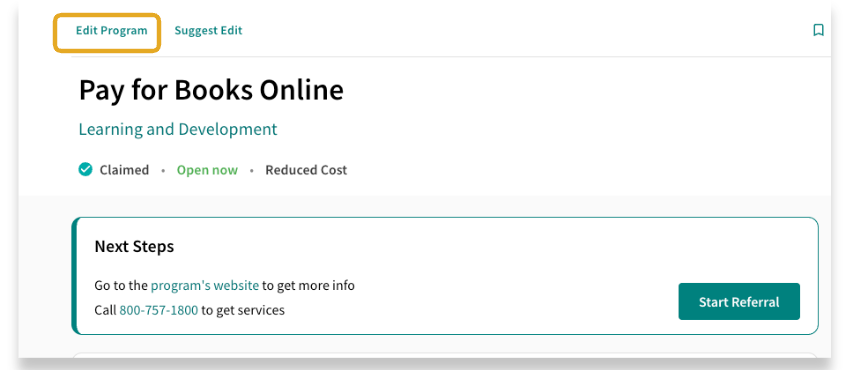
To enter Program Manager, click on the program’s name from the program card to open the detailed view. Then, select “Edit this Program” to access the Program Manager. You must be logged into your site to see this option.
Once you are in Program Manager, use the navigation panel to click on Special Fieldsets.
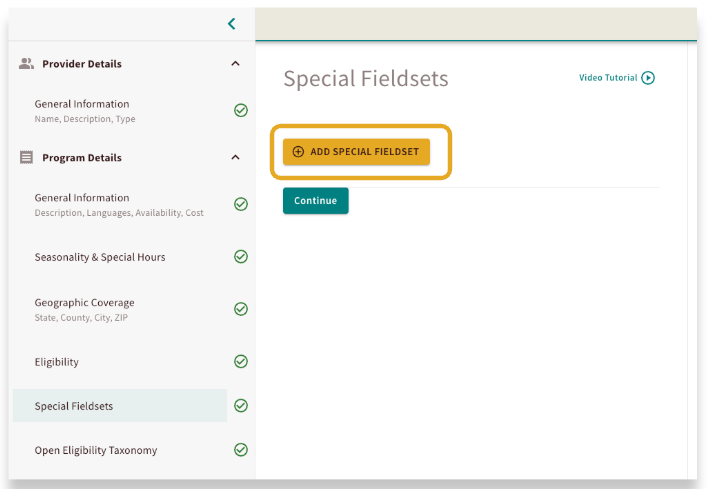
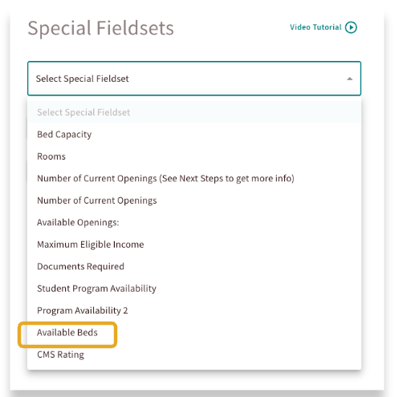
Click on the Add Special Fieldset button and select Available beds from the drop down menu.

This will create a chart for you to fill out. You will input the number of available female and male beds for this program.
Once you have added the Special Fieldset, click on Publish.

Updating the Available Bed Special Fieldset
Once this fieldset has been added, you can make updates as availability changes. Simply click on the program’s name from the program card to open the detailed view. Then, select “Edit this Program” to access the Program Manager. Navigate to the Special Fieldset section.

You can update the chart to reflect the new availability. Click on publish and then refresh your window to see the update made!
Once this Special Fieldset has been added to a program, a Community Based Organization can make updates to this if they have claimed their program.