
The Flyout Activity dashboard shows the frequency of Flyout activity and how users are interacting with those Flyouts.
What is a Flyout?
Flyouts allow you to share a call to action with your users based on where they search and/or what they search for. Flyouts appear in the bottom right corner of your site. They can be configured to appear based on when a user takes a specific action or actions, such as searching for term(s) within a certain area. Work with your Customer Success Manager to set up a Flyout!
If your organization provides a 24/7 hotline for people seeking domestic violence support, you could use a Flyout to appear as a call to action to call your organization. In this example, the Flyout appeared when the user searched for the term, safe housing.
You Can Use This Dashboard To
- Understand how often Flyouts appear
- Understand how users engage with the Flyout
In doing so, they can use the data to understand the effectiveness of Flyouts, including open rates and more.
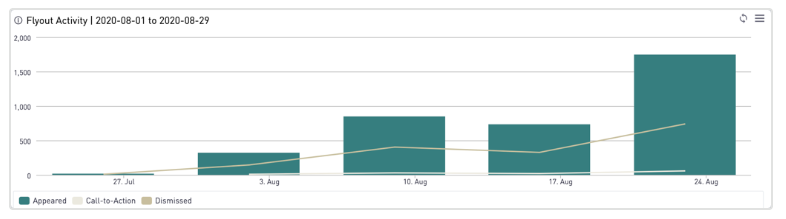
You can use this dashboard to determine which flyouts are most active on your site, which ones are most successful, and how often a specific flyout is clicked on. For the best results, you'll want to use a combination of the following filters: Site, Flyout, Date Range, Aggregation.