
The Search Activity Dashboard shows search trends for members of your group(s). You can see overall search trends and use filter to look at searches within specific geographic areas or social care priorities.
You Can Use This Dashboard To
- Understand general search trends in terms of volume, search term, and geography
- See how searches within a service category have changed over time
- See how searches within a certain geography have changed over time
- Understand activity coming from search boxes and referral URLs
In doing so, you can use this data to provide additional services, target your outreach in certain areas, or serve additional areas for people in need.
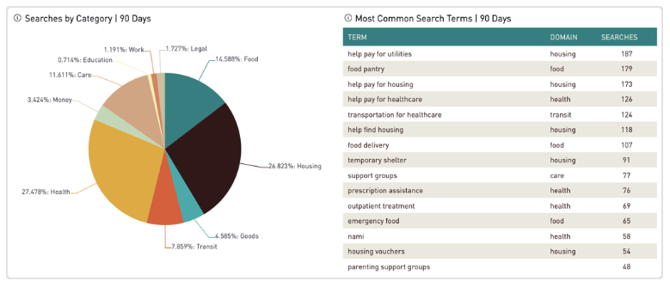
You can use a combination of some or all of the following filters to get the level of granularity required:
- Site
- Term
- Situation Tag
- Group
- State
- Date Range
- Aggregation
This report can help highlight areas for strategic investment and additional support.