
As the nation’s largest social care network, Findhelp connects millions of people to local resources in every ZIP code. This guide provides an overview of how we maintain a high standard of care and how you can manage your presence on the platform.
We will cover our Listability Guidelines, walk through the specific information displayed on your Program Card, and show you how to contribute to the network by suggesting new programs or submitting edits to keep your information accurate.
Learn More About Findhelp Listability Guidelines
To maintain a high standard of care, programs listed on all of our platforms must follow our Listability Guidelines. This ensures every resource on our platform is accessible, actionable, and affordable.
Programs we list must be:
1. A Free or Reduced Cost Program
To qualify as a "free or reduced-cost" program, a resource or service must meet at least one of the following criteria:

-
No-Cost Access: The program or service is provided entirely free of charge.
-
Significant Discount: The cost is at least 33% below the standard market rate for the local community.
-
Financial Assistance: Direct financial aid is available to help participants cover costs.
-
Sliding Scale Fees: Pricing is adjusted based on the participant's income level.
-
Subsidized by Donations: The program accepts monetary donations specifically to offset costs for its participants.
2. A Direct Service Program

A program is considered Direct if it serves as the primary point of access for a specific resource or service. We define a program as direct when:
- Seekers can self-refer to a program to access services, even if the program requires an intake or referral from another organization.
- Additionally, navigators have the ability to initiate contact with a program on behalf of a seeker.
3. And a Needs Based Program
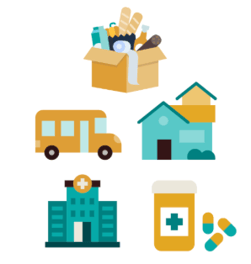
When determining if a program is needs based, look for a program whose services help contribute to or maintain safety and physiological needs and dignity for a seeker. Then determine if it falls under a basic or secondary need.
Questions to ask when determining this:
- What need does it serve?
- Does this resource serve an under-resourced community? (ex low income, homeless, etc.)
If a program doesn't meet all three of those criteria, it can be listed on a specific customer site, but it won't appear on all platforms.
Learn More About How Your Program Information Is Displayed
The Program Card provides a high-level summary of your services so users can find what they need quickly. It is comprised of three main sections.
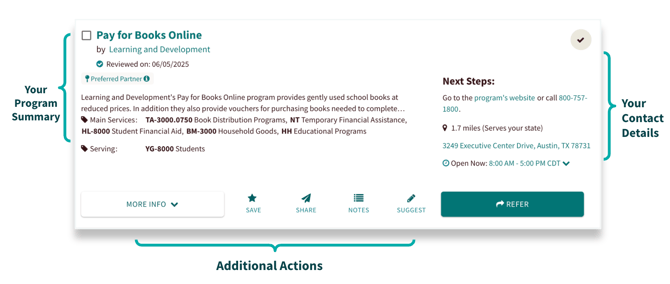
Program Summary | This section prominently features your program and organization names, followed by a summary of your services. It also includes program tags, which are essential for searchability: service tags ensure you appear in keyword and category searches, while 'who we serve' tags help your program surface when seekers apply personal filters.
Next Steps | This section provides the direct pathway for people to reach your services. Sourced from your website or direct outreach, it includes:
- Contact Details: Essential info needed for a seeker or navigator to reach out.
-
Location & Hours: Displays your physical address and when you are available.
-
The Connect Button: Links users to your preferred intake method or a referral form.
Additional Actions | This section provides additional tools and context for your program. From here, seekers and navigators can also:
-
More Info: An expanded view of program costs, availability, supported languages, and specific requirements. They can also print this resource out.
-
Engagement Tools: Options for users to Favorite, Share, or leave private Notes for their team.
-
Suggest an Edit: Allows users to flag incorrect or missing information to ensure your listing remains accurate.
Learn How to Suggest a Program or Edit
To help maintain the accuracy of our network, you can easily update existing information or add new resources to the platform.
-
Suggest an Edit: If you notice that any information on your program card is incorrect or outdated, you can suggest an edit directly as the program provider. This ensures seekers and navigators always have access to the most current details.
-
Suggest a Program: If you are searching for your program and it isn't yet listed on Findhelp, you can use the "Suggest a Program" tool to submit it to our team for review.
By contributing these updates, you help ensure that every resource in our community remains accurate and accessible to those who need it most.
To view a detailed guide on this process, check out our knowledge base article on Suggesting Updates to our Platform.
Up Next
Learn more about platform features!