
The Program Manager Tool utilization report shows your organization’s utilization of the Program Manager Tool. You can use this dashboard to:
- Understand overall staff engagement with the program manager tool
- Understand individual edits and program additions being made to your network
- Comprehensively view which programs are "nonlistables" (programs not published on the Findhelp public database) on your sites
Note: This report is classified under PII (personally identifiable information) reporting, as it will include the names and contact information for the staff members who are using the Program Manager Tool.
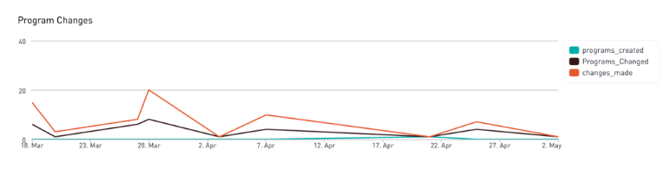
Views on the Program Manager Tool Report
NOTE: throughout the various reports that you can access on the reports page, you'll see a binary 1/0 listed to indicate whether the program is "nonlistable" (1) or "listable" (0).
Nonlistable Flag:-
- 1: Program is nonlistable, it will only be available on your site(s)
- 0: Program is listable and accessible across Findhelp’s network
Workers with Program Changes or Created Programs
- See which users are engaging with the Program Manager Tool and how
- Understand the quantity of edits/additions that each staff member is making
- Distinguish between your internal (staff) sites, if you have multiple.
Program Changes Detail
You can dive deeper into the exact edits being made to specific programs.
- See lists of edits by program and by user
- Identify trends in edits made or programs being updated
- Understand key details about edits being made
Program Created Detail
You can see the exact additions being made to your network
This includes viewing additions by user and by the type of program (listable vs nonlistable). This report will also indicate where in the approval process the program is.- Program Approval:
- B: Program is published and live
- C = Program is pending (Findhelp Curation will review)
- X = Program has been deleted
- Nonlistable Flag:
- 1: Program is nonlistable, it will only be available on your site(s)
- 0: Program is listable and accessible across Findhelp’s networkUnderstand key details about additions being made:
Nonlistables Detail
This table will show you all programs that are nonlistables on your site(s). This is an important table, as all nonlistable programs are 100% owned by the customer/CBO. Findhelp’s network curation team does not update or edit nonlistable programs as part of their traditional network review.
For each nonlistable program that your organization has created, you can:- See what site(s) your programs are listed and available on
- View the creation date and when the program was last updated
- Understand key engagement details about your nonlistable programs such as connections and referrals (are staff utilizing these programs as intended?)