
This Program Summary dashboard summarizes programs counts and claims information for a your organization’s service area (if selected). Using filters, you are able to understand how many programs exist across geographical areas and within social needs categories. The dashboard also supports understanding program engagement across your service area or selected region.
You Can Use This Dashboard To
- See how many programs, organizations, and claims exist on your site(s)
- See the most engaged programs in your network along with organizational information to inform and support outreach strategy
- Understand if claiming trends correlate with your program outreach strategies
- See recently claimed programs
- See any customer-requested programs on your site
In doing so, they can use that data to inform outreach strategy, identify target community partners,and quantify the impact of program outreach.
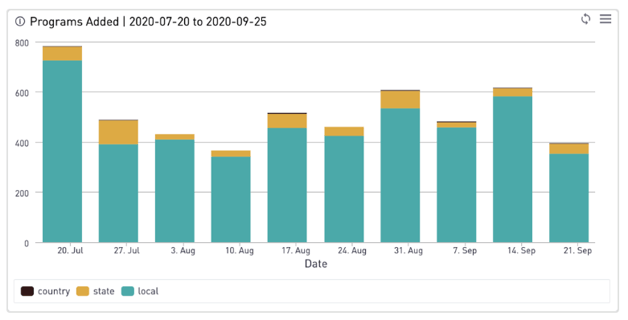
You may want to understand general program counts and claims in your service area or selected geography. You may also explore trends around newly added programs, claimed programs over time, and understanding the most engaged with programs and most recently claimed. You can use this dashboard to gain insight into:
Overall Network
- Total number of programs listed in my service area
- How many organizations offer programs across different domains of need
- How many programs have been added in my service area within a date range
Claim Summary
- Number of claimed programs in my service area
- Number of programs claimed in my service area during a specific time period
- See programs claimed over time by adjusting the date range
Most Engaged Programs
Most engaged programs can inform engagement, outreach, and promotional strategies by learning about the programs with the most engagement in your network.
- Most engaged programs
- Most engaged programs by geography
- Most engaged programs by category
For the best results, you'll want to use a combination of some or all of the following filters: Site, Category, State, and Date Range.