
Seeker Context is a powerful feature that connects you to an individual's profile, making it easier to assist the Seekers you are working with. It does the following:
- Saves Referrals: Any program referrals you submit on behalf of that seeker are automatically saved directly to their care record.
- Auto-fills Forms: It automatically uses the personal information previously gathered (name, address, etc.) to fill out forms and assessments for you.
- Saves Time: You avoid the need to repeatedly enter the same details, allowing you to assist the Seeker quickly and efficiently.
Once initiated, a banner will show at the top with the Seeker’s information.

How do you get into seeker context?
You can enter the focused Seeker Context through three main access points, depending on where you are working in the platform:
- System Integration: Automatically enter context when launching the platform from your system of record (your existing case management system).
- Seeker Profile: Start an assessment or referral directly from within the Seeker's individual profile.
- Dashboard Access: Launch it by clicking on the refer button next to your seeker's name from the People I'm Helping dashboard—your centralized view of all the individuals you assist.
Once you activate Seeker Context, the platform ensures you are only working with this one individual. Here is what changes:
- Dedicated Focus: When seeker Context is active, you are only able to navigate and submit referrals on behalf of that specific seeker.
- Menu Change: The regular "People I'm Helping" menu temporarily disappears. It is replaced by a direct link back to the profile of the seeker you are currently assisting.
- Why this happens: This is a crucial safety measure to prevent errors. It stops you from accidentally mixing up information or saving a service to the wrong seeker's file while you are working.
How do you exit seeker context?
To exit out of a seeker's record and move to help the next person, you will need to click on 'End Session'.
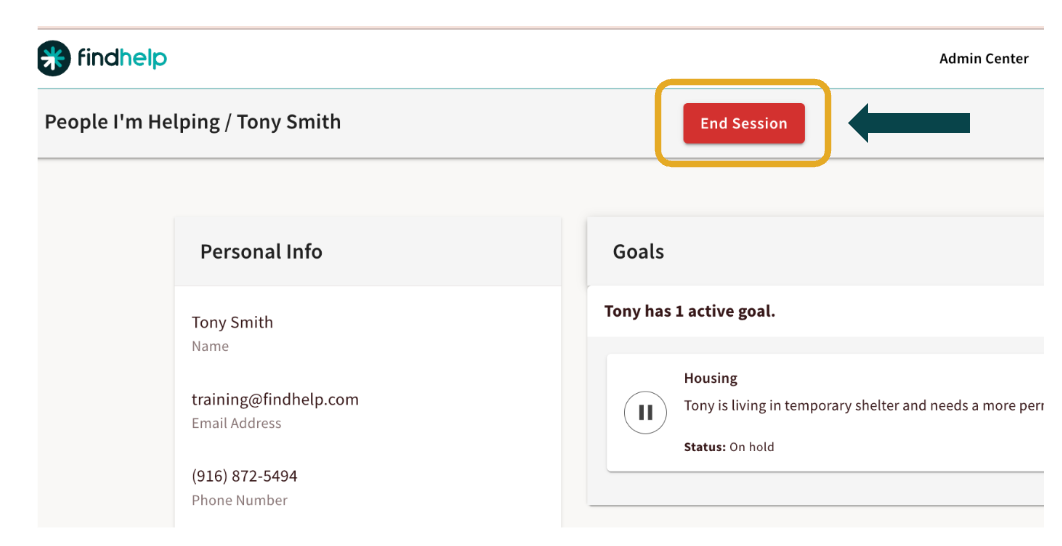
You can end the session inside of their seeker profile
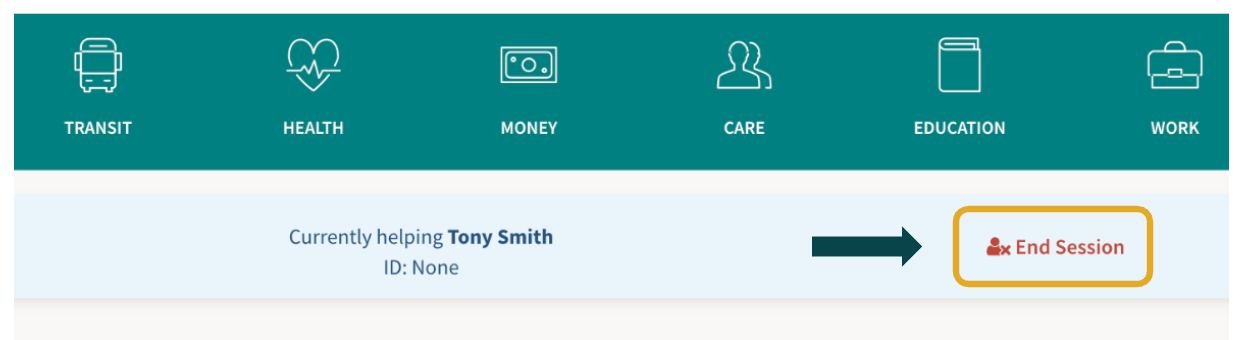
Or when you are inside of a search
This is important to do after you are finished with an interaction so you ensure you are adding the right information to the right record.