
The Site Activity dashboard provides an overview to help customers track and drive platform adoption. Each graph aligns with the adoption framework to guide your implementation and optimization strategy. The dashboard includes key metrics like users, sessions, searches, interactions, connections, referrals, and activities related to care and program management.
Filters allow you to view metrics by specific user groups or geographic areas for deeper insights.
You Can Use This Dashboard To
- Track trends in users, sessions, searches, interactions, connections, and referrals.
- Analyze how adoption metrics vary across platforms and user groups.
- Monitor changes in adoption metrics within specific geographic areas over time.
- Review activity originating from search boxes and referrals.
In doing so, customers can use that data to understand community and staff adoption, inform your platform strategy and serve additional areas for people in need.
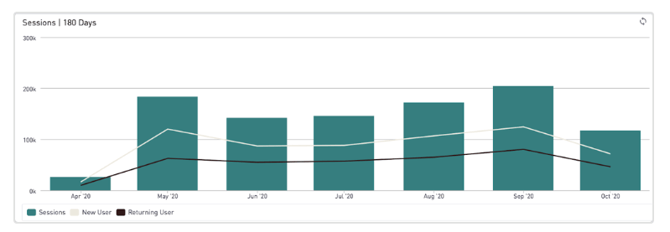
Here are a few insights you can gather from this dashboard:
- User Summary: Understand general user trends, including user types (logged in or visitor count) usage by group, and activity using our search filters.
- Search Summary: View searches broken out by site, search box, or referral URL.
- Interactions: Track interactions to understand user engagement with programs, and view interactions broken out by site.
- Connections: Track connections to understand how many people are trying to connect with services, and view connections broken out by site.
- Referrals: Track and view referrals broken out by site.
- Help Care Management: Helper care management activities, such as viewing a seeker profile or submitting an assessment form, reflect higher-level engagement with the platform and can help inform workflows and training for helper staff.
- Program Management Activity: Program management activities, such as updating or editing a program, reflect higher-level engagement with the platform and can inform outreach strategies and community education.