
As a customer, it is helpful to understand what highly vulnerable areas that lack access to critical social services exist in your community. This information can be helpful to better understand your community, target community engagement efforts, or target programming to try and fill in these observed gaps in services.
The Social Care Index dashboard, is a tool to help users better understand findhelp program data in the context of the Social Vulnerability Index. The Social Care Index Dashboard combines the Center for Disease Control’s Social Vulnerability Index (SVI) and findhelp’s social service program data into an easy to navigate dashboard.
You Can Use This Dashboard To
- Understand what geographic areas in your community are highly vulnerable and lack access to critical social services
- Understand what programs are available in specific geographic areas of your community that lack access to those particular social services
Using the Dashboard
If you are a user with aggregate reporting access, you can access this dashboard directly in your analytics suite. This dashboard works similar to other findhelp dashboards, with a number of filter options available. These filters enable you to only show programs that meet a certain criteria, like providing “Food” programs, or to exclude city and county government programs.
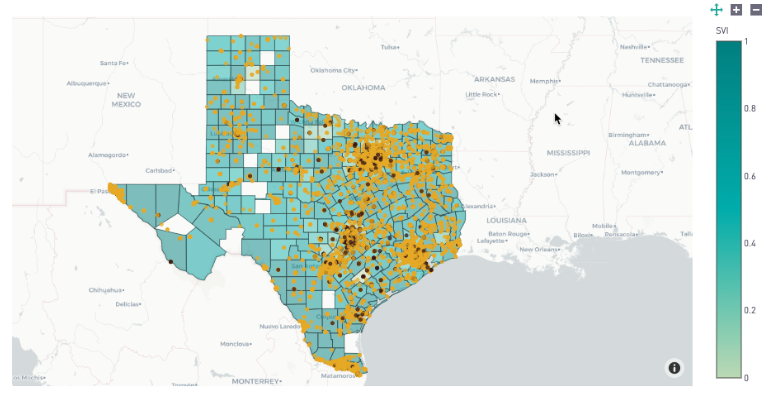
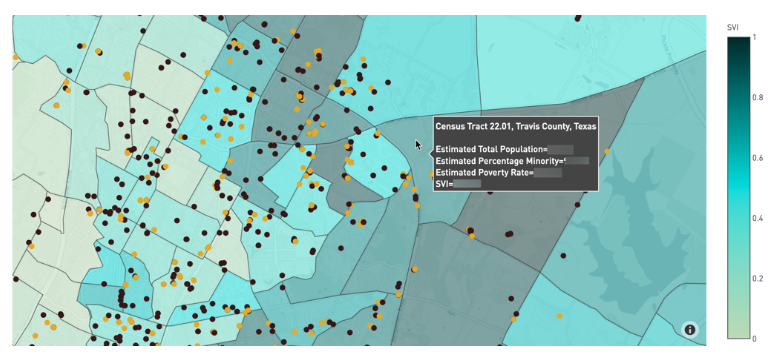
Once in the dashboard, the map shows census tracts colored from light to dark based on its unique SVI score, with the darker shade of blue indicating higher social vulnerability. Hovering over a census tract will display the SVI, the percentage minority, and the estimated poverty rate of that census tract.
Each dot on the map represents a program service location. Gold dots represent unclaimed programs and brown dots represent claimed programs.
Frequently Asked Questions
Why can’t I view this dashboard for other counties and states?
This dashboard is configured to show information for the area that your organization operates in. Please speak with your Customer Success Manager if you do not think the dashboard is not displaying your full service area correctly.