
What is the Connect Button?
The "connect" button on each program card is dynamic, adapting its label and function to match the organization's unique intake workflow. By reflecting the program's specific referral type and established next steps, it shows Seekers and Navigators how to initiate outreach and access services.
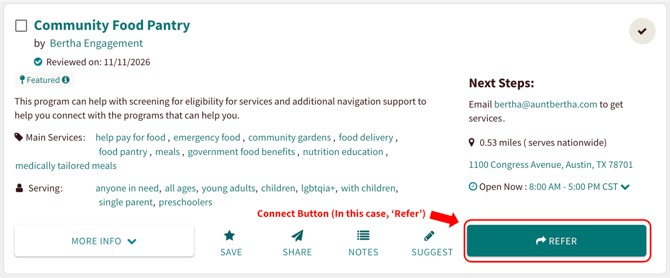
You can find the connect button on the bottom right of each program card.
Live versus Logged Referrals
Depending on if the referral is live or logged, the connect button language will vary. To learn more about sending program referrals, check out our 'Sending Program Referrals' article!
Live Referrals: The connect button language reflects an action taken within the platform. This indicates a direct, digital hand-off where information is sent through the system to the organization.
Logged Referrals: The connect button language reflects an action taken outside the platform. This is used to document a real-world interaction, such as a phone call, an email, or an in-person visit that has already occurred.
'REFER' and 'CONTACT HERE'


"The 'REFER' and 'CONTACT HERE' buttons indicate a live referral, appearing whenever that is the best way to reach the program via Findhelp. This is the same setting; however, the language on the button changes based on the type of user. Navigators will see 'REFER' and non-logged in users / logged in Seekers will see 'CONTACT HERE'.
Example of the 'REFER' Connect Button
Example of the 'CONTACT HERE' Connect Button
'APPLY HERE'

Example of the 'APPLY HERE' Connect Button
'CONTACT ON THEIR SITE'
The 'CONTACT ON THEIR SITE' connect button represents a logged referral, appearing whenever the best way to reach a program is via a contact form on their external website
Example of the 'CONTACT ON THEIR SITE' Connect Button
'SCHEDULE ON THEIR SITE'
The 'SCHEDULE ON THEIR SITE' button represents a logged referral, appearing when the best way to connect with a program is through a scheduling tool, typically hosted on their website.
Example of the 'SCHEDULE ON THEIR SITE' Connect Button
'APPLY ON THEIR SITE'

The 'APPLY ON THEIR SITE' button represents a logged referral, appearing when the best way to reach a program is through an external application, typically hosted on their website.
Example of the 'APPLY ON THEIR SITE' Connect Button

The 'SEE NEXT STEPS' button represents a logged referral, appearing when the best way to reach a program involves calling, emailing, or visiting in person.
Example of the 'SEE NEXT STEPS' Connect Button
Updating the Connect Button
The Findhelp internal Curation team sets the connect button initially based on their program research. Programs can claim their listing and update this information directly. Once claimed, they can edit their contact settings. *Coming soon - A support article on how Community Based Organizations can update their contact settings!