
The Intake Scheduler allows claimed organizations to easily create, schedule, and manage appointments with people in need of services (Seekers) as part of their intake process.
Benefits of Using a Scheduler
-
Show Availability: Display open time slots for your program locations.
-
Flexible Booking: Book appointments on behalf of Seekers, or let them self-book.
-
Team Scheduling: Book appointments for your colleagues.
-
Calendar Sync: Save calendar invites directly to your colleagues' work calendars.
Important Things to Consider When Setting Up Scheduling
Before you launch your scheduling tool, please review these key limitations regarding appointment locations and how the tool interacts with your program page.
📍 Location Requirements
-
Program Offices Only: Appointments can only be booked at a registered program office. If you have a temporary site, you must add it as a program office in the system first.
-
No Virtual or Phone Appointments: The tool requires a physical address. You cannot currently create appointments without a location (such as for phone or video meetings).
-
Public Visibility: Any appointment slots you make available will be published to your program's public scheduling page. Anyone with access to that page will be able to book them.
🟢 How Scheduling Works with the "Connect" Button
The scheduling tool does not automatically sync with the Connect button on your program card. Because of this, there is a risk of duplicate referrals (e.g., a Seeker books an appointment, then returns to the search page and fills out the Connect form as well).
To prevent this, you can choose one of two setups based on your workflow:
-
Option A: Appointment-First Workflow If you want an appointment to be the very first point of contact, contact our team. We will configure your green Connect button to link directly to your program’s scheduling page.
-
Option B: Standard Workflow If you want to screen or speak with Seekers before they book an appointment, leave the Connect button as-is. You will need to manually share your scheduling page link with Seekers when they are ready.
Setting Scheduling Up
To add a scheduler to your program as a connect step, you must be a claimer on your program card.
Need to claim your program? Check out this resource to learn how!
Step 1: Sign in to your account and go to My Program Tools and select Edit Program Listings. Click Contact Settings for the program you'd like to add Scheduling.
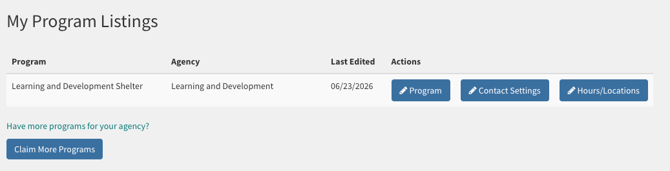
Step 2: Go to When someone lets us know they are interested in your program, what should we do? and select from the dropdown menu: Schedule an appointment.
.png?width=670&height=498&name=Zight%202026-6-24%20at%209.05.31%20AM%20(1).png)
Step 3: You will hear back from an Findhelp Team Member within 48 business hours regarding your setup.