
What is the Self-Service Tool?
Once a Trusted Network is set up for a customer organization, site administrators can add and archive programs to keep their network up-to-date.
Note: This feature is specifically for customers who are currently part of one of more Trusted Networks. If you do not currently have a Trusted Network enabled and want to create one, please reach out to your CSM contact.
See more about Trusted Networks here: Selecting Your Partners
Why Should You Use It?
Being able to add and archive programs from your Trusted Network helps you independently and autonomously manage your organization's trusted network(s), ensuring that your network stays up-to-date and tailored to the needs of the people that you serve.
How to Use the Self-Service Tool
Access our "quick start guide" here.
Open the Trusted Networks Tool
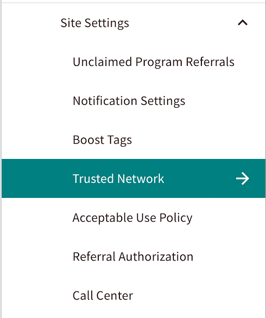
Go to the Admin Center from the toolbar on your staff site. You'll see a "Trusted Network" option visible on the left-hand sidebar, under Site Settings.
Select The Network to Manage
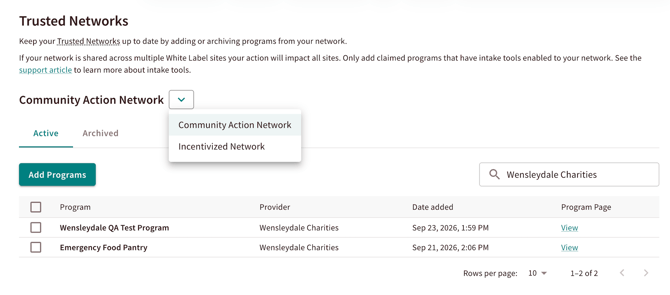
If you have multiple trusted networks configured, you will see a drop-down menu to select the specific network that you want to manage.
 Add a New Program
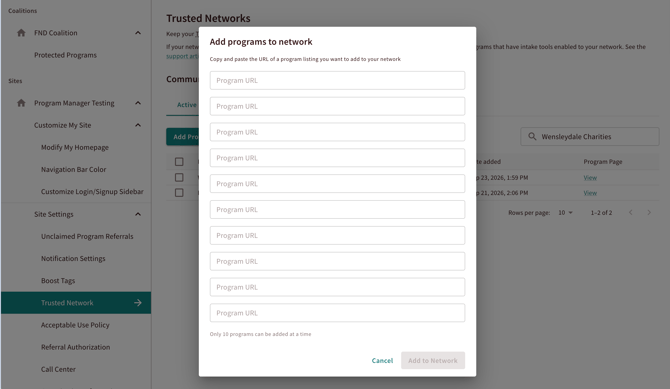
You can easily add programs by entering the program urls or program ids. You can add up to 10 programs at a time!
Boosting a Trusted Network on your whitelabel ensures that all programs you add to the network automatically become boosted and have your Trusted Network label attached.
Archive a Program
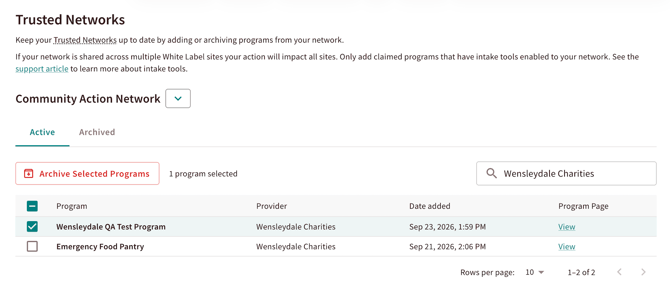
You can remove programs from a network by checking the box next to the program(s) that you want to remove. In the "Active" tab, and click "Archive Selected Programs".
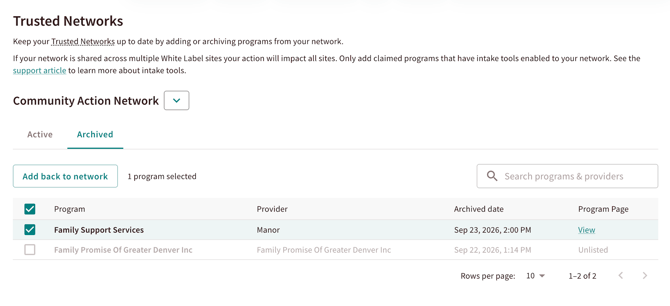
Note: You can add an archived program back into your network, as long as it is still active and claimed on Findhelp.
Re-Adding a Program
Go to the Archived tab, select the program checkbox, and select "Add back to network."
As a site administrator, you can add, archive, and re-add programs to your Trusted Network(s). If you are starting a Trusted Network for the first time, or creating a new Trusted Network, this will still need to be done by a Findhelp team. Please reach out to your CSM for support.
If your organization has a dedicated Community Impact leader, make sure to check our our Community Impact Lead program to learn more about building a Trusted Network and managing community partnerships.