
*Please note that you will not see this report unless your site administrator gives you access, click here for more information.
The Search Activity dashboard shows search trends and helps your organization identify main areas of need. Using filters, you can understand what your users are searching for in general, in specific geographic areas, or within certain social care areas.
You Can Use This Dashboard To
- Understand general search trends in terms of volume, search term, and geography
- See how searches within a service category have changed over time
- See how searches within a certain geography have changed over time
- Understand activity coming from search boxes and referrals
In doing so, you can use this data to provide additional services, target your outreach in certain areas, or serve additional areas for people in need.
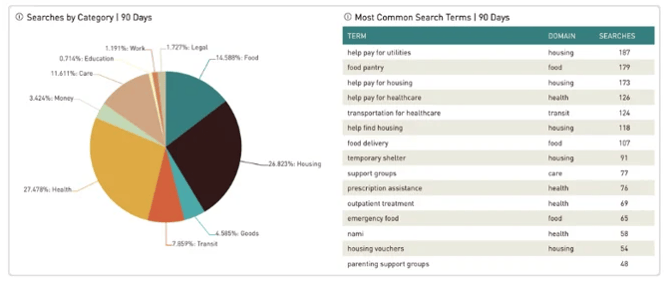
Overall Search Trends
You may want to understand general search trends for what people are searching for on your site, where they’re searching, and the volume of searches.
- See what people are searching for within a certain area, or compare different areas to see trends and differences.
- See what different populations are searching for when you filter by situation_tag
- See top searches in an area or over time
- See how search trends have changed over time
- Compare searches with the Program Summary Dashboard to identify gaps
- Understand activity coming from search boxes and referral
Report Filters
Use the Traffic Filter to break down search activity on your site into three categories:
- Organic (Default): Searches made by real people visiting your site. This view opens automatically so you can immediately see actual community behavior.
- Bot-driven: Searches from automated tools, including search engine indexers, AI crawlers, and web scrapers.
- All traffic: The combined total of organic and bot-driven searches (matches previous reporting).
You can switch between these views at any time using the filter menu at the top of your report.
This filter is exclusive to the Search and Site Activity Dashboards.