
In this article find quick answers to common questions about managing your Findhelp account, editing program listings, troubleshooting claimer email issues, and contacting the Findhelp Support team.
Table of Contents
How do I edit a program listing?
Why am I not receiving a claimer confirmation email?
Why am I receiving a 401 error on the link to claim my program?
Does Findhelp support international users?
How do I provide information needed for troubleshooting to the support team?
How do I get in touch with support?
How do I edit a program listing?
- Community Based Organizations:
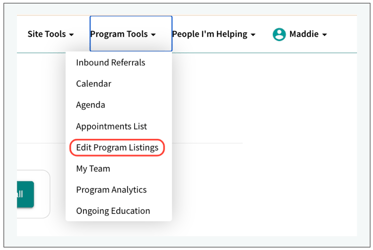
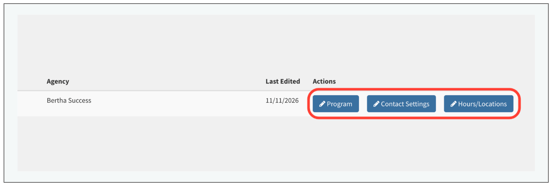
- As a claimer of a Community Based Organization's program on Findhelp, you can navigate to 'Program Tools' in the upper right hand tool bar, then select 'Edit Program Listings', see additional details here.
- Registered Users (Customers):
- Registered site users are able to edit programs within Findhelp’s Program Manager Tool directly from the program card, see additional details here.
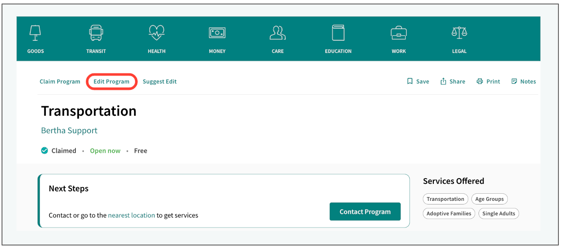
- Registered site users are able to edit programs within Findhelp’s Program Manager Tool directly from the program card, see additional details here.
- Individual Seeking Services:
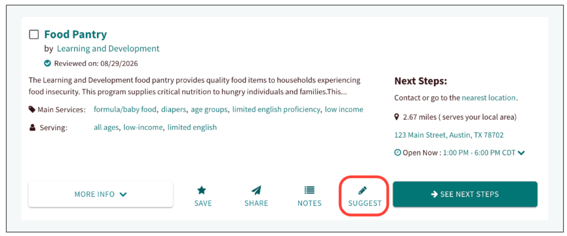
- If you notice incorrect or outdated information on an existing program card, click the 'Suggest' button. From here, you can submit a request directly to our Network Curation team that details the specific edits needed, see additional details here.
How do I reset my password?
- If you need to reset your password, log out of your account and click Sign In. Select the link that says 'First-time user? Forgot your password', enter your email address and submit the request. Check your inbox for the password reset link. If it doesn't appear after a few minutes be sure to check your spam or junk folder. If you still don't receive the email, please contact support@findhelp.com for a password reset link (please note that password reset links sent by our Support Team are available for 24 hours).
Why am I not receiving a claimer confirmation email?
- If you aren't receiving expected emails from Findhelp, start by checking your Spam or Junk folder and marking any Findhelp messages as 'Not Spam'. To keep future emails in your inbox, please allowlist Findhelp domains by following this article. If you continue to have trouble accessing your claimer account, please email support@findhelp.com
Why am I receiving a 401 error on the link to claim my program?
- If you receive a 401 Error when clicking the claim verification link, first check if the email was sent over two days ago - Claimer links automatically expire after 48 hours and require a new request. You may also see this error if you are already a verified claimer, or if you are currently logged into Findhelp under a different email account.
How do I delete my account?
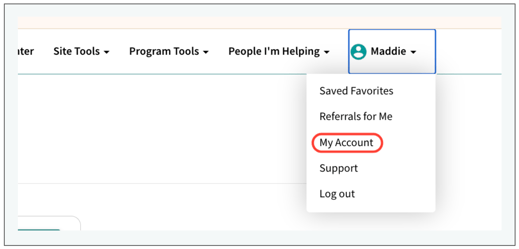
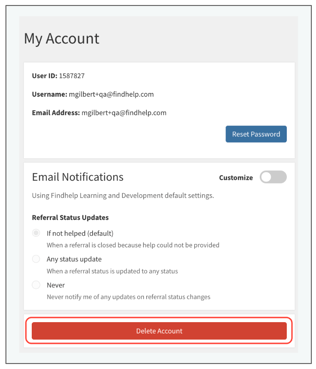
- You must be logged into the duplicated account you want to delete. Click on your name in the upper right hand corner and select 'My Account'. From here, select 'Delete Account'. Selecting the 'Delete Account' button will automatically submit a ticket for our support team remove your account.
Does Findhelp support international users?
-
At this time, Findhelp does not currently support users outside of the United States, Mexico, and the United Kingdom.
How do I provide information needed for troubleshooting to the support team?
- When receiving support from the Findhelp team, we may request screenshots or an IP address location.
- To locate an IP address click here
- Apple screenshot instructions
- Windows screenshot instructions
How do I get in touch with support?
- To get in touch with Findhelp support, you can fill out this form or send an email to support@findhelp.com. When submitting a request, adding a detailed description will allow our team to quickly complete updates.